
754
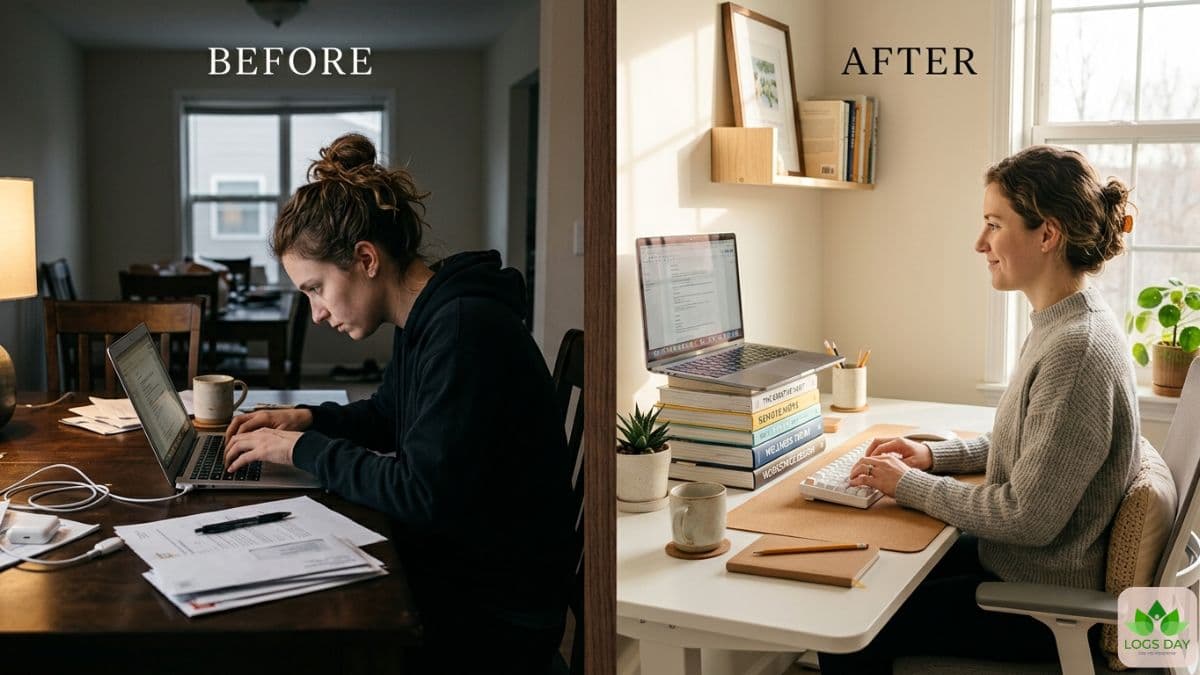
It started with a small pain in my wrist. Then came the stiff neck. After that, I noticed I was feeling tired even after sitting for only a few hours. One day, during a long work call, I realized I had been leaning toward my laptop screen for almost an hour. My shoulders hurt. My back felt tight. I knew something had to change.
That’s when I began to learn about better posture, smarter desks, and simple habits to make work easier. I thought ergonomic setups would be expensive. But I was mistaken. A few small changes made a big difference. My work seemed easier. I felt lighter in my body. My focus improved too.
Today, more people work from home than ever before. Many use dining tables, couches, or beds as workspaces. It may feel comfortable at first. But over time, poor posture can cause headaches, back pain, eye strain, and wrist problems. This is why a smart setup matters.
This detailed ergonomics guide for home office setups will help you create a space that feels comfortable, healthy, and productive. You do not need fancy equipment. You only need the right steps and simple habits.
What Ergonomics Really Means
People often hear the word ergonomics and think it only means expensive office chairs. But ergonomics is much more than that. It simply means designing your workspace in a way that supports your body. A good setup reduces stress on your muscles and joints. It also helps you stay comfortable for long hours.
Think about how your body feels after working for a full day. If your neck hurts, your wrists feel stiff, or your eyes feel tired, your setup may not support your body properly. Ergonomics focuses on fixing those problems before they become serious.
A smart setup can improve energy, concentration, and even mood. It can also reduce small daily discomforts that slowly build over time. Good posture is not about sitting perfectly straight like a robot. It is about keeping your body relaxed and supported.
This ergonomics guide for home office workers is especially useful today because many people now work from home, cafes, and offices. A flexible and healthy setup matters more than ever. Mayo Clinic experts say that good office ergonomics can help prevent neck pain, back pain and wrist strain while working from home. "Chair height, equipment spacing and desk posture all make a difference," they say.
Dr. Edward Laskowski, medical editor for Mayo Clinic News Network, highlights that ergonomics is making your workspace fit your body, not the other way around.
Step 1: Start With the Right Chair Adjustment
![[image]](https://admin.logsday.com/storage/media/Start_With_the_Right_Chair_Adjustment_2026-05-14_18-28-27_R0Dd5ePY.jpg)
Your chair is the base of your workspace. If the chair feels wrong, your whole body suffers. Many people use chairs that are either too low or too high. This creates pressure on the lower back and shoulders.
A proper chair should support your spine naturally. Sit all the way back in the chair. Your lower back should feel supported. Your feet should rest flat on the floor. Your knees should stay at a 90-degree angle. The armrests should allow your shoulders to stay relaxed. If your shoulders rise while typing, lower the armrests. If your arms hang awkwardly, raise them slightly.
An expensive chair is not always necessary. You can improve a basic chair by adding a rolled towel or a small cushion behind your lower back. Even this small change can help a lot. A good ergonomic chair adjustment also improves blood flow and reduces tiredness during long work hours. If you work from home daily, your chair should feel supportive, not painful.
Also read: Best Sleeping Position for Back Pain: Easy Ways to Sleep Better and Wake Up Pain-Free
Step 2: Follow the Correct Monitor Height and Distance
![[image]](https://admin.logsday.com/storage/media/Follow_the_Correct_Monitor_Height_and_Distance_2026-05-14_18-32-41_pXT5hP7B.jpg)
Your monitor position affects your neck, eyes, and posture. Many people place screens too low. This forces the head to tilt downward for hours. Over time, that creates neck strain.
The top of your screen should stay at or slightly below eye level. Your screen should also remain about an arm’s length away from your face. This is a simple monitor height guide that works for most people. If you use two monitors, place the main screen directly in front of you. Avoid twisting your neck repeatedly during work.
Brightness matters too. If your screen is too bright, your eyes feel tired. If it is too dim, you may lean closer to read text. Try matching screen brightness with the room lighting. Books, sturdy boxes, or monitor stands can lift your screen to the correct height without spending much money. Small changes can protect your neck for years.
This ergonomics guide for home office users strongly recommends checking monitor position before buying expensive equipment. Sometimes the solution is already in your room.
Step 3: Place Your Keyboard and Mouse Correctly
![[image]](https://admin.logsday.com/storage/media/Place_Your_Keyboard_and_Mouse_Correctly_2026-05-14_18-34-20_ORfV4Hn1.jpg)
Your hands and wrists work constantly during the day. Poor keyboard placement can create wrist strain and shoulder pain very quickly. Your keyboard should stay close enough so your elbows remain near your body. Your wrists should stay straight while typing. Avoid bending them upward.
The mouse should sit beside the keyboard, not far away. Reaching too much creates shoulder tension. Many people ignore early signs of discomfort. But wrist pain often starts slowly. A proper desk setup can help prevent wrist pain and other future problems. A wrist rest may help some users, but the main goal is keeping the wrists neutral and relaxed. Type lightly instead of hitting keys aggressively. Wireless keyboards and mice can also help reduce clutter and improve arm movement. If your desk is small, try using a keyboard tray or a compact keyboard. This part of the ergonomics guide for home office work is important because typing takes up a huge part of the workday for most remote workers.
Step 4: Improve Lighting to Reduce Eye Strain
![[image]](https://admin.logsday.com/storage/media/Improve_Lighting_to_Reduce_Eye_Strain_2026-05-14_18-38-37_2A23P5Li.jpg)
Lighting changes how your body feels during work. Poor lighting creates eye strain, headaches, and mental tiredness.
Natural light is usually best. Try placing your desk near a window if possible. But avoid strong sunlight directly hitting your screen. Glare forces your eyes to work harder. A soft desk lamp can help during evening work hours. Warm lighting often feels more relaxing than harsh white light.
Your screen should never be brighter than the room around you. If the room is dark and the screen is extremely bright, your eyes become tired faster. Blinking also matters. People blink less while staring at screens. This causes dry eyes. Look away from your screen every 20 minutes. Focus on something far away for a few seconds.
Good lighting also improves video calls. Your face should stay softly lit from the front instead of from behind. Simple lighting changes can make you feel more awake and comfortable. A complete home office ergonomics setup always includes healthy lighting habits, not only chairs and desks.
Step 5: Support Your Feet and Lower Body
![[image]](https://admin.logsday.com/storage/media/Support_Your_Feet_and_Lower_Body__2__2026-05-16_18-00-55_h1AxJcj6.jpg)
Many people forget about foot support. But your feet affect your posture more than you think.
If your feet hang while sitting, pressure builds in the thighs and lower back. Your body starts adjusting in unhealthy ways. Your feet should stay flat on the floor whenever possible. If your chair is too high, use a footrest. You do not need an expensive product. A thick book, wooden board, or storage box can work well.
Avoid crossing your legs for very long periods. It may feel comfortable for a few minutes, but it often shifts posture unevenly. Standing desks are also becoming popular. They can help reduce sitting time. But standing all day is not ideal either. The best solution is movement and balance.
Switch between sitting and standing when possible. Stretch your legs often. Walk around during phone calls. Even short movement breaks improve comfort. This ergonomics guide for home office setups focuses heavily on body balance because lower body support directly affects your spine and shoulders.
Step 6: Understand Laptop vs Desktop Ergonomics
![[image]](https://admin.logsday.com/storage/media/Understand_Laptop_vs_Desktop_Ergonomics_2026-05-14_18-52-19_PL7kjnPe.jpg)
Laptop users face unique problems. The screen and keyboard are attached together. This forces people to either look down or raise their arms awkwardly. Laptop ergonomics is extremely important today because millions of people work from beds, couches, and kitchen tables.
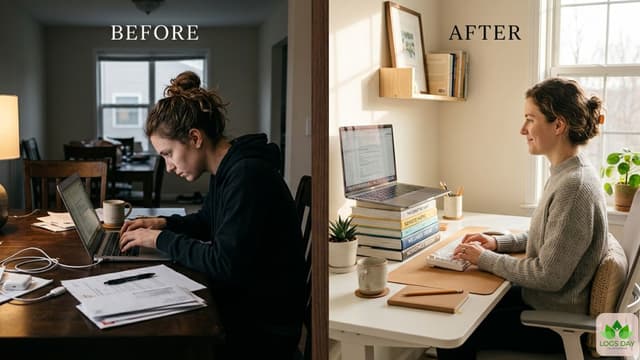
If you use a laptop for long hours, raise the screen using a stand or stacked books. Then connect an external keyboard and mouse. This simple setup protects your neck and wrists. A desktop setup usually allows better positioning because the monitor and keyboard are separate. But desktops still need proper height adjustments.
Travel workers should also think carefully about posture. Working at airports or cafes often leads to poor sitting habits. Portable laptop stands are now affordable and lightweight. Even a small foldable stand can make a huge difference. This ergonomics guide for home office users especially recommends external keyboards for daily laptop work. It is one of the easiest and most effective upgrades.
Step 7: Build a Better Video Call Setup.
![[image]](https://admin.logsday.com/storage/media/Build_a_Better_Video_Call_Setup._2026-05-14_19-00-12_vtCrcBXp.jpg)
Video calls are now part of daily work life. But many people unknowingly create bad posture habits during meetings. When your camera sits too low, you naturally bend your neck downward. Raise the camera to eye level whenever possible.
Your background also matters. A clean and simple background reduces distractions. Good lighting helps you appear more professional and reduces face shadows. Use headphones or earbuds during long calls. This prevents neck strain caused by holding phones between the ear and shoulder. Try sitting back in your chair instead of leaning toward the screen. Many people lean forward during conversations without realizing it.
A stable internet connection also reduces stress. Constant audio delays make people tense and frustrated. A smart ergonomic desk setup should support both productivity and communication. Since meetings now happen daily, video call comfort deserves proper attention too.
Also read: Weighted Blanket Sleep Benefits: How I Improved Sleep and Reduced Stress Naturally
Step 8: Explore Budget Ergonomic Solutions
![[image]](https://admin.logsday.com/storage/media/Explore_Budget_Ergonomic_Solutions_2026-05-14_19-01-49_KcmLTpmD.jpg)
Many people believe ergonomics costs a lot of money. But smart solutions do not always require expensive products.
Books can raise monitors. Cushions can improve chair support. Folded towels can support the lower back. A small box can become a footrest. You can also upgrade slowly over time. Start with the biggest problem first. Maybe your neck hurts the most. Focus on monitor height first. Maybe your wrists hurt. Improve keyboard positioning first.
Affordable accessories are also improving every year. Many good laptop stands, cushions, and footrests now cost much less than before. Second-hand office furniture can also save money. Some businesses sell high-quality office chairs at lower prices after upgrading equipment.
Do not wait for the perfect setup before improving comfort. Even tiny changes matter. This ergonomics guide for home office workers encourages practical thinking. Your goal is not a fancy workspace. Your goal is a healthier body and a more comfortable workday.
Step 9: Do a Simple Self-Assessment Posture Check
.![[image]](https://admin.logsday.com/storage/media/Do_a_Simple_Self-Assessment_Posture_Check_2026-05-14_19-03-41_Jm3DWd1C.jpg)
Most people do not notice poor posture until pain starts. That is why self-checks are important.
Take a quick photo of yourself while working. Look at your shoulders, neck, and wrists. Are you leaning forward? Is your head tilted down? Are your wrists bent sharply? Your ears should stay roughly aligned with your shoulders. Your shoulders should feel relaxed, not lifted. Notice how often you shift positions. Constant discomfort is usually a sign something needs adjustment.
Ask yourself simple questions. Do your eyes feel tired every evening? Does your lower back ache after work? Do your hands feel numb sometimes? These signs often point toward setup problems. A proper ergonomics guide teaches awareness, not perfection. Your body constantly gives signals. Learning to notice those signals early helps prevent larger problems later.
Step 10: Follow a 15-Minute Daily Reset Routine
![[image]](https://admin.logsday.com/storage/media/Follow_a_15-Minute_Daily_Reset_Routine_2026-05-14_19-05-40_zWHHAVKp.jpg)
Even the best setup cannot replace movement. The human body is not designed to sit for endless hours. A simple 15-minute reset routine can refresh your body and mind every day. Start with neck rolls for one minute. Move slowly and gently. Next, stretch your shoulders by rolling them backward several times. Stand up and stretch your arms overhead. Take deep breaths.
Walk around your room or hallway for three minutes. This improves blood circulation. Stretch your wrists by extending your arms and gently pulling your fingers backward. Do a few bodyweight squats or calf raises. Small movements wake up tired muscles. Finally, rest your eyes by looking outside a window or at a distant object for one minute.
This routine may sound simple, but consistency matters more than intensity. Many people focus only on buying products. But daily movement is one of the most powerful tools for long-term comfort and health.
Summing Things up
A healthier workspace does not happen overnight. It improves step by step. Even very small changes can create noticeable results.
Your body works hard for you every single day. A better setup protects your energy, posture, focus, and long-term health. You do not need a luxury office. You only need awareness and smart habits. Start with one improvement today. Raise your screen. Adjust your chair. Stretch your shoulders. Add foot support. These simple actions can completely change how your workday feels.
The best workspace is not the most expensive one. It is the one that supports your body naturally and helps you feel comfortable from morning to evening.
Keep following Logsday for simpleR lifestyle, wellness, and productivity tips that make everyday life easier.
Also read: The Seasonal Natural Allergy Relief Guide Every Household Needs